Lab 3: JavaScript Functions and Event Handlers
This is an introduction to JavaScript Functions and Event Handlers
Functions Explained
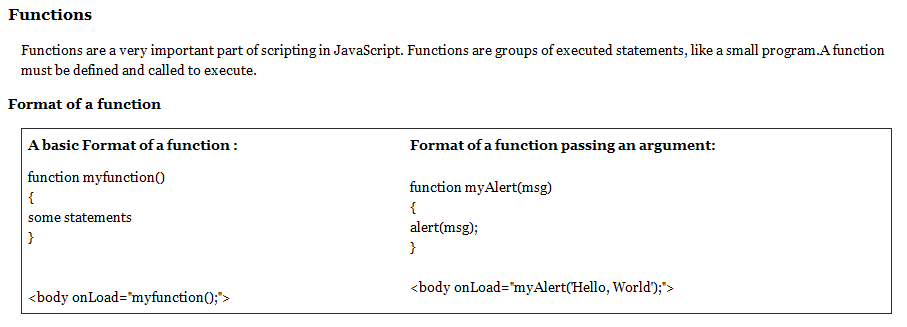
Define a Function
A function includes the function name, a list of arguments to the function, enclosed in parentheses and separated by commas, and the JavaScript statements that define the function, enclosed in curly braces.
Call a Function
Defining a function does not execute the statements.The function must be called to run. Functions are usually called by event handlers or a call to the function followed by the paraenthses and parameters. Functions can also be called by other functions.
Variables and Functions
If you declare a variable within a function, the variable can only be accessed within that function. When the function is exited, the variable is destroyed. Variables within functions are local variables. You can have local variables with the same name in different functions though that is not advised. This is possible because each variable is recognized only by the function in which it is declared.
If a variable is declared outside a function, all other functions can access the variable. The lifetime of these variables starts when they are declared, and ends when the page is closed.
Create a new file called lab3_function.html

Save the file into your JS folder. This is a more practical example of the greeting script from last week because it takes into account all the possible user actions.
The function is placed between script tags in the head section of the page.
1. The first step is you need to define the function with the function command. The function name ends with a set of parenthesis and when it is called it executes the code between the curly brackets.
2. The first statement within the curly brackets creates the name variable and stores the users prompt response into it.
3. Here we have an if statement that checks to makes sure the variable name is not null and not empty (an ! in javascript means not.). If these are true then it writes the greeting onto the page.
4. The final statement uses the getElementById method to select the msg div and place within it the greetings using the .innerHTML.
Complete Code: lab3_functions.html
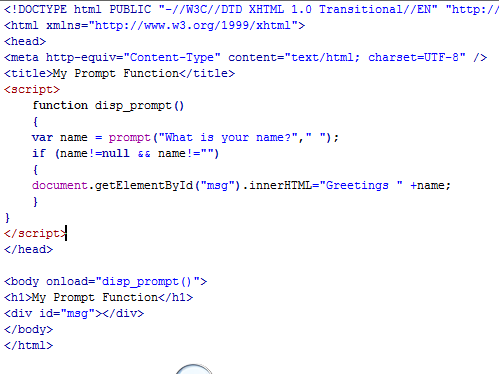
In order to execute a function, it needs to be called. In this example, an onload event handler within the body tag executes the function.
Event Handlers
Understanding "event handlers" in JavaScript
So, what are event handlers? Very powerful and useful! They are JavaScript code that are not added inside the <script> tags, but rather, inside the html tags, that execute JavaScript when something happens, such as pressing a button, moving your mouse over a link, submitting a form etc. The basic syntax of these event handlers is:
name_of_handler="JavaScript code here"
For example:
<a href="http://google.com" onClick="alert('hello!')">Google</a>
As you can, this is certainly unlike a regular JavaScript code in that here we're inserting it directly inside a HTML tag, via the onClick event handler. When the above link is clicked, the user will first see an alert message before being taken to Google.
Different event handlers with with different HTML tags. For example, while "onclick" can be inserted into most HTML tags to respond to that tag's onclick action, something like "onload" (see below) only works inside the <body> and <img> tags. Below are some of the most commonly used event handlers supported by JavaScript:
Event Handlers:
onclick: Use this to invoke JavaScript upon clicking (a link, or form boxes)
onload: Use this to invoke JavaScript after the page or an image has finished loading.
onmouseover: Use this to invoke JavaScript if the mouse passes by some link
onmouseout: Use this to invoke JavaScript if the mouse goes pass some link
onunload: Use this to invoke JavaScript right after someone leaves this page.
Quoted fromhttp://www.javascriptkit.com/javatutors/event1.shtml
Circle Function

Create a file named lab3_circle.html and save it into your js folder.
Create the function above between the head tags of your page.
The first state of the function creates the area variable and multiples the square of the radius variable to the Math.PI object (3.14).
The next stateament rounds off the area of the cirlce use the Math.round() object and then prints the result into an alert box
Call the Circle Function
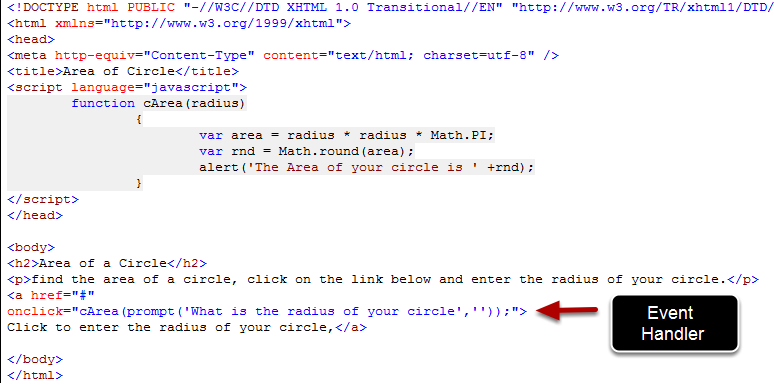
You need to add an onclick event handler to execute your function.
<a href="#" onclick="cArea(prompt('What is the radius of your circle',''));"> Click to enter the radius of your circle,</a>
Notice that this function is passing a user prompt as the radius parameters into the function.
Function and Event Handler Example: Study Guide Script
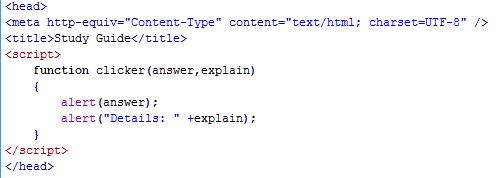
Create a third file named lab3_study_guide.html and save it into your js folder. Add the function above, between script tags within the head of the page.
The clicker function has two parameters that are passed through the funciton. One is named answer and the other explain. You can think of parameters as variables that pass values into the JavaScript statements within the function. In this example, each parameter will be printed in a popup alert.
Call the clicker function with an event handler
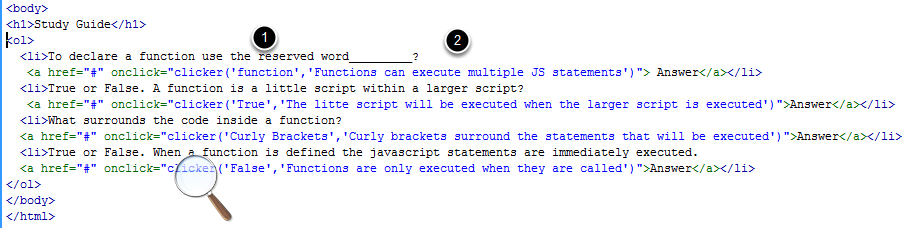
The clicker function does not execute when the page loads. Instead, an event handler within the body of the web page will execute the function when the buttons are clicked.
This clicker functions have two text strings.
1) The first text string is stored in the answer parameter and
2) the second text string is stored within the explain parameter.
<a href="#" onclick="clicker('function','Functions can execute multiple JS statements')"> Answer</a>
Complete Code of Study Guide Lab

Here is the complete code for the Study Guide Lab:
<html>
<head>
<title>Study Guide</title>
<script>
function clicker(answer,explain)
{
alert(answer);
alert("Details: " +explain);
}
</script>
</head>
<body>
<h1>Study Guide</h1>
<ol>
<li>To declare a function use the reserved word_________?
<a href="#" onclick="clicker('function','Functions can execute multiple JS statements')"> Answer</a></li>
<li>True or False. A function is a little script within a larger script?
<a href="#" onclick="clicker('True','The litte script will be executed when the larger script is executed')">Answer</a></li>
<li>What surrounds the code inside a function?
<a href="#" onclick="clicker('Curly Brackets','Curly brackets surround the statements that will be executed')">Answer</a></li>
<li>True or False. When a function is defined the javascript statements are immediately executed.
<a href="#" onclick="clicker('False','Functions are only executed when they are called')">Answer</a></li>
</ol>
</body>
</html>